


One rate estimates fleet MDVR storage: at 1080p with H.265 — about 2 Mbps per camera — each camera records roughly 0.9 GB per hour. Multiply by camera count and daily hours, then add parking recording and a retention buffer. A 4-camera system on a 10-hour day needs about 36 GB per day. H.264 roughly doubles it.
The formula
Daily storage (GB) ≈ cameras × driving hours × rate per camera-hour
Rate per camera-hour ≈ bitrate (Mbps) × 3600 ÷ 8 ÷ 1000
With the assumptions labeled, because the assumptions are the estimate:
- 1080p, H.265, ≈ 2 Mbps per camera — a common mid setting for vehicle recording.
- 2 Mbps × 3600 seconds = 7200 Mb/h ≈ 900 MB ≈ 0.9 GB per camera-hour.
- H.264 at the same quality needs roughly double the bitrate → ≈ 1.8 GB per camera-hour.
- Lower resolution or capped bitrates reduce the rate; higher settings raise it.
Codec background: H.265 (HEVC) is the ITU-T successor to H.264, designed for much higher compression at the same picture quality — which is where the halved storage figure comes from.
The recorder's drive size sets the retention window.
These are planning rates, not measured results. Actual bitrates depend on scene complexity, frame rate, and each device's encoder settings — which is exactly why the formula is open: change the assumptions to match your configuration.
Worked examples
| Setup | Cameras | Hours/day | Codec | Daily storage |
|---|---|---|---|---|
| Delivery van | 4 | 10 | H.265 | ≈ 36 GB |
| City bus | 6 | 14 | H.265 | ≈ 76 GB |
| Heavy truck | 8 | 10 | H.264 | ≈ 144 GB |
| Same truck, H.265 | 8 | 10 | H.265 | ≈ 72 GB |
Two things the examples show: codec choice halves or doubles the same fleet's storage, and longer duty cycles (buses) add up faster than camera count alone suggests.
From daily storage to retention days
Retention is what you actually buy:
Retention days ≈ drive capacity ÷ daily storage
A 4-camera van at 36 GB/day keeps about 14 days on a 512 GB drive — and about 28 on 1 TB. If your policy requires 30 days, the formula tells you the drive size, not the other way round.
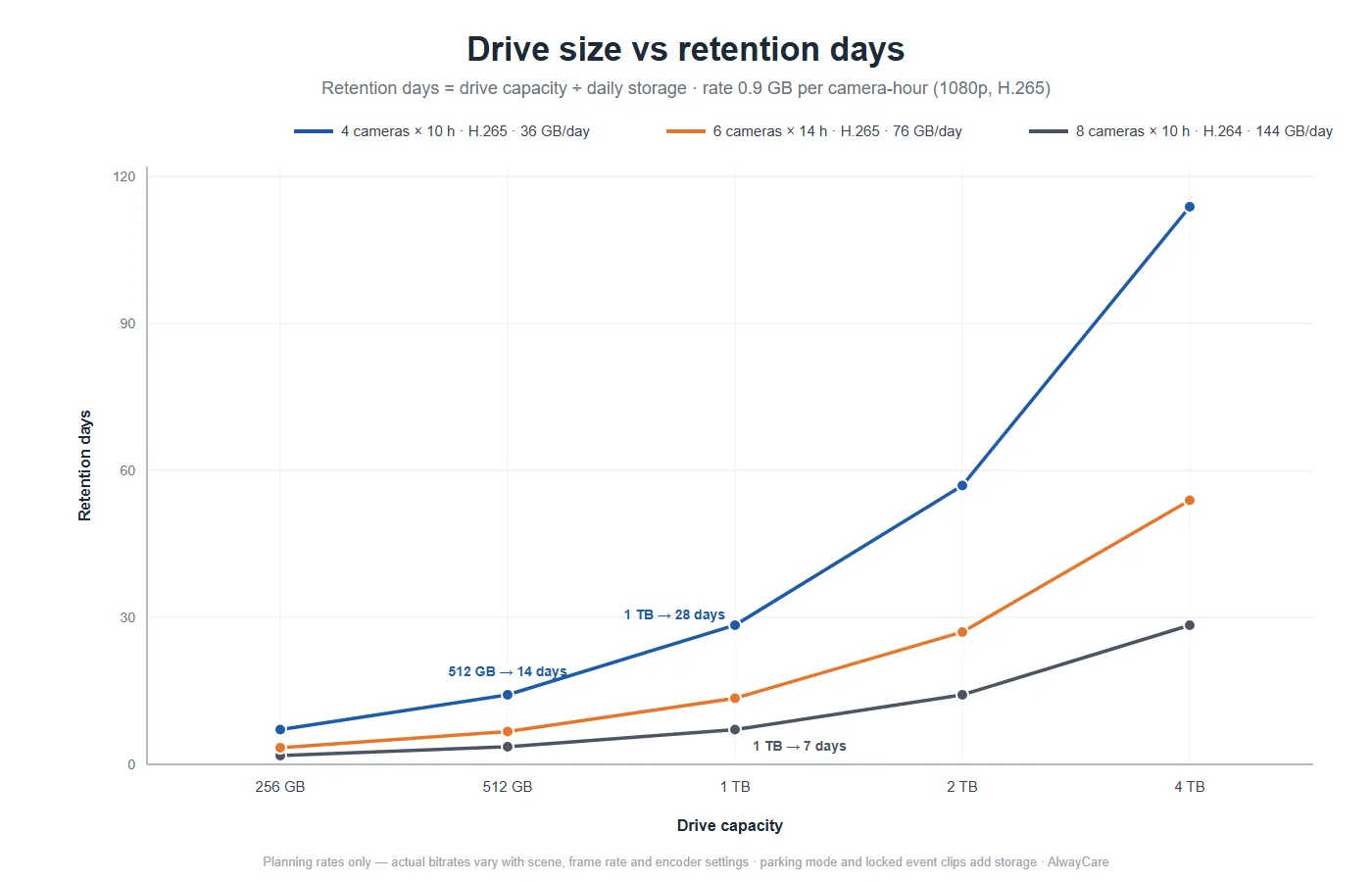
Retention days by drive size, from the formula above — planning rates only.
Add buffer for the things the base rate excludes:
- Parking recording — event-triggered adds little; continuous parking mode can add hours per day.
- Locked event clips — G-sensor events are kept beyond the loop; usually a small share.
- Audio tracks — a modest addition when enabled.
- Upload copies — if event clips also upload to a platform, local retention is unaffected, but plan SIM data separately.
The four levers that change the result
- Codec: H.264 → H.265. The single biggest lever — roughly halves storage at the same quality.
- Bitrate caps. Capping per-camera bitrate trades some image detail for predictable storage.
- Event-triggered parking mode. Records only on impact or motion instead of continuously.
- Retention policy. Shortening retention is a policy decision, and often the cheapest one — match it to your actual claim windows instead of defaulting to "keep everything".
Confirm before you buy
The estimate decides the size class; the quotation decides the details:
- Confirm which storage media types and capacities the recorder supports — models differ, and media type affects both cost and vibration tolerance.
- Confirm encoder settings can be adjusted per channel — mixed camera types often need different rates.
- Confirm whether AI channels record differently from recording channels on hybrid systems.
Honest limit: this calculator estimates recording storage only. It does not cover platform cloud storage or SIM data usage, and no formula replaces a quotation check against the specific device.
Frequently asked questions
How much storage does a 4-camera MDVR need per day? At 1080p H.265 (≈ 2 Mbps per camera), about 36 GB per 10-hour day — roughly 1.8 GB per camera-hour on H.264. Adjust the rate to your actual settings using the formula above.
How many days of footage will 1 TB hold? Daily storage divides into it: a 4-camera H.265 van at 36 GB/day keeps about 28 days on 1 TB; an 8-camera H.264 truck at 144 GB/day keeps about 7. Your retention policy picks the drive size.
Does H.265 really halve storage? At the same perceived quality, H.265 typically needs roughly half the bitrate of H.264, so yes at planning level. Confirm your devices encode H.265 on all channels — some record only on certain inputs.
How does parking recording change the estimate? Event-triggered parking adds little; continuous parking mode adds recording hours per day and can rival driving hours. Include it as extra hours in the formula if you run it.
Should we keep 30 days of footage? Keep what your claims and complaints actually require — often less than 30 days. Retention is a policy lever: matching it to real claim windows usually saves more than any codec change.
Size your storage with your camera plan
Send us your camera count, hours of operation, and retention policy — we will return a storage calculation with media options and a quotation to match.
- Browse our Mobile DVR and AI MDVR ranges.
- Planning the system first? Read MDVR vs Dash Cam and 4-Channel vs 8-Channel vs 12-Channel MDVR.
- Running buses? See Bus Camera Systems for position planning.

