


How Much 4G Data Does a Fleet MDVR Use?
How Much 4G Data Does a Fleet MDVR Use?
A commercial Mobile Digital Video Recorder (MDVR) does not upload continuous video over cellular networks. This guide breaks down the five data streams, the engineering calculation formula, realistic fleet sizing examples, and how to choose an M2M SIM plan without overpaying for bandwidth.
The Short Answer
A commercial fleet 4G MDVR typically consumes between 1 GB and 8 GB of cellular data per vehicle per month under standard operational profiles. The unit records high-definition video continuously 24/7 directly to local internal storage (ruggedized SD cards or SSDs), which consumes zero cellular data. 4G LTE bandwidth is only used when data actively leaves the vehicle: live camera streaming (substream), automated alarm clips (ADAS/DMS triggers), remote video downloads, and lightweight GPS telematics telemetry. Fleets requiring extensive live monitoring or high-frequency event audits consume between 15 GB and 35+ GB monthly per vehicle.
What Uses Mobile Data in an MDVR System?
A persistent misconception in fleet procurement is that a 4-channel or 8-channel Mobile DVR constantly streams multi-camera video over the cellular network. In reality, continuous cellular video streaming is neither technically sustainable nor financially viable. A 4-channel 1080p system recording at 2 Mbps per channel produces roughly 3.6 GB of video per operating hour. Running that system for 200 monthly driving hours would consume over 720 GB of cellular data per vehicle, triggering severe carrier throttling and massive data invoices.
Instead, commercial MDVR systems utilize a hybrid edge-and-cloud architecture. The onboard recorder acts as an edge server, storing 100% of footage locally on solid-state media. Cellular mobile data is reserved strictly for five specific network operations:
| Data Stream / Operation | Transmission Stream | Typical Resolution & Bitrate | Operating Frequency | Monthly Data Impact |
|---|---|---|---|---|
| 1. Live Remote Streaming | Substream (Low Bitrate) | D1 / CIF @ 256–512 kbps | On-demand by dispatch (1–15 mins/day) | 500 MB – 5 GB |
| 2. Automated Event Uploads | Mainstream / Substream | 1080p (2 Mbps) or D1 (512 kbps), 15s clips | Trigger-based (5–25 events/day) | 300 MB – 2.5 GB |
| 3. Remote Incident Downloads | Mainstream (Full Quality) | 1080p @ 2–4 Mbps per channel | Ad-hoc incident review (1–3 times/month) | 200 MB – 1.5 GB |
| 4. GPS Location & CAN Telematics | Binary Packets | JT/T 808 or MQTT telemetry | Continuous interval (every 10–30s) | 30 MB – 90 MB |
| 5. Platform Signaling & Keep-Alives | Heartbeat Packets | Network handshakes & status queries | Continuous periodic ping (every 30–60s) | 10 MB – 30 MB |
| 6. Continuous Local Storage (24/7) | Internal SATA / SD Bus | 1080p Full HD @ 2–4 Mbps per channel | Continuous while ignition is ON | 0 MB (Zero Cellular Data) |
Separating edge-recorded evidence from cloud-transmitted telemetry allows fleet operators to maintain full visibility while keeping monthly cellular overhead strictly under control.
How to Calculate MDVR Video Data Usage
Calculating the cellular consumption of an MDVR requires converting video transmission bitrates into data volume across specific time intervals. Bitrate is expressed in megabits per second (Mbps) or kilobits per second (kbps), while cellular carrier data quotas are billed in decimal gigabytes (GB) (where 1 GB = 1,000 Megabytes).
Engineering Calculation Formula
To calculate the cellular data consumed by video transmission across any channel count and duration:
Data (GB) ≈ (Bitrate in Mbps × Number of Channels × Duration in Seconds) ÷ 8 ÷ 1,000Formula Notes: Divide by 8 to convert megabits to megabytes (MB). Divide by 1,000 to convert decimal megabytes to standard telecom gigabytes (GB). For real-world deployments, add a 10% to 15% protocol overhead buffer to account for TCP/IP packet framing, streaming handshakes, and cellular retransmissions in weak signal zones.
When applying this formula across an active fleet, consider four essential technical factors:
- Dual-Stream Configuration: Never calculate live viewing using the local recording bitrate (2 to 4 Mbps). Live streaming should almost always pull the secondary substream (256 to 512 kbps), which uses 80% to 90% less cellular data.
- Multi-Channel Viewing: If a dispatcher monitors a 4-channel split screen simultaneously, multiply the substream bitrate by 4. If viewing a single targeted blind-spot or driver camera, the multiplier is 1.
- Audio Stream Inclusion: If two-way audio or in-cabin ambient audio recording is enabled during live streams or event uploads, add 32 to 64 kbps per active channel (G.711A or AAC encoding).
- Variable Bitrate (VBR): Stationary vehicles idling at a traffic light generate significantly fewer bits than vehicles traveling at highway speeds through rain or complex nighttime traffic.
MDVR Dual-Transmission Architecture
To prevent excessive telecom charges, commercial fleet video telematics systems employ dual transmission pathways. The diagram below shows how video streams, alarm triggers, and heavy historical archives move across the vehicle hardware, the 4G LTE cellular gateway, depot Wi-Fi, and the central fleet CMS cloud:
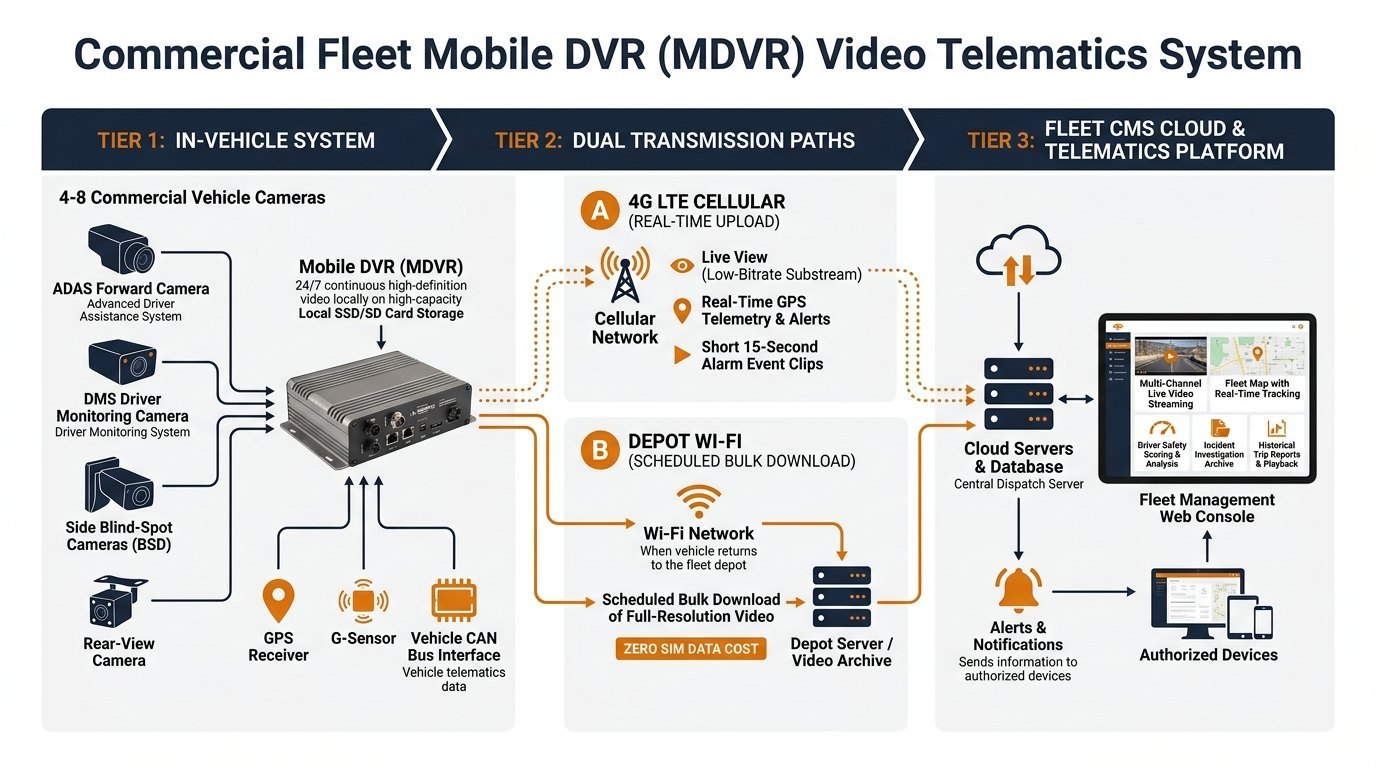
As illustrated, the MDVR unit coordinates inputs from forward ADAS cameras, driver monitoring DMS cameras, blind-spot BSD sensors, and vehicle CAN bus telemetry. High-resolution raw footage remains securely on local solid-state storage until an authorized dispatcher requests a specific incident window or the vehicle returns to the terminal for high-speed Wi-Fi offload.
Three Worked Examples for Fleet Buyers
Operating conditions vary across commercial transport sectors. The following three scenarios represent realistic operational profiles for fleet budgeting. Note: All calculations are illustrative engineering estimates based on stated operational parameters; actual consumption varies with video scene complexity and cellular signal conditions.
Urban Delivery & Service Van
Operates on local metro delivery routes. Primary needs are live vehicle tracking, reckless driving alerts, and occasional live camera spot-checks.
Construction & Heavy Haul Truck
Operates in demanding highway and worksite environments. Active driver safety management with DMS distraction/fatigue tracking and blind-spot monitoring.
High-Value Cargo & Cash-in-Transit
High-security operations requiring frequent live visual verification, tight geofencing, constant driver monitoring, and rapid multi-angle incident retrieval.
What Changes the Monthly Data Total?
Fleet operators frequently discover that identical vehicles on different routes consume contrasting amounts of cellular data. Several technical variables directly influence this variance:
1. Compression Codec: H.264 vs. H.265 (HEVC)
The compression standard implemented by your MDVR hardware determines bandwidth efficiency. High-Efficiency Video Coding (H.265 / HEVC) achieves approximately 35% to 45% bitrate reduction compared to legacy H.264 at identical visual fidelity. Deploying H.265-capable MDVR hardware enables sharper remote streaming while consuming substantially less mobile data.
2. Substream Bitrate and Frame Rate Tuning
MDVR firmware provides independent tuning for mainstream and substream channels. While mainstream recording is configured for high fidelity (1080p @ 25 fps, 3 Mbps), the substream should be optimized strictly for cellular efficiency. Lowering the substream from D1 (704×576) to CIF (352×288) or reducing the frame rate from 25 fps to 12 or 15 fps cuts streaming data consumption by half without hindering situational awareness.
3. Event Trigger Sensitivity & Debounce Logic
Automated uploads are triggered by G-sensor thresholds (harsh braking, cornering) and AI camera alerts (DMS fatigue, distraction, phone use). If G-sensor thresholds are set too sensitively on stiff commercial chassis, minor road imperfections trigger dozens of false alarm video uploads daily. Establishing proper alarm debounce intervals and edge AI filtering prevents runaway data usage.
4. CMS Server Video Distribution
The streaming architecture of the central Fleet Management Server (CMS) is critical. When multiple dispatchers view a vehicle's live camera simultaneously, an unoptimized system may command the MDVR to transmit multiple separate cellular streams. An enterprise CMS server receives one 4G stream from the vehicle and re-distributes that stream across client web sessions, eliminating duplicate cellular charges.
How to Reduce Data Usage Without Losing Evidence
Balancing safety oversight with telecom budgets requires clear operational rules. Experienced fleet operators implement four proven engineering practices:
- Default to Substream Live Viewing: Restrict client software permissions so dispatchers default to substream video during routine monitoring. Reserve full 1080p mainstream streaming strictly for active emergency investigations.
- Optimize Event Buffer Durations: Keep automated alarm clips concise. A 15-second clip (5s pre-alarm + 10s post-alarm buffer) is sufficient to establish fault in traffic collisions. Expanding clips to 60 seconds quadruples event data usage with negligible evidentiary gain.
- Automate Depot Wi-Fi Bulk Offload: Equip fleet yards with 5.8 GHz Wi-Fi access points. When vehicles return to base, the MDVR automatically offloads high-definition shift recordings to the central server at zero cellular SIM cost.
- Targeted Snapshot Verification: When dispatchers only need to confirm cargo status or driver presence, request a single high-resolution still snapshot (JPEG). A snapshot consumes only 80 to 150 KB, whereas 30 seconds of live video consumes 1.5 to 3.0 MB.
Companion Monthly Data Budget Worksheet
Use the following template to estimate monthly cellular data requirements per vehicle. Enter your planned operational values, multiply by your fleet size, and determine whether individual SIM plans or pooled data packages provide the most cost-effective coverage.
| Transmission Parameter | Engineering Baseline Value | Daily Frequency / Duration | Calculated Monthly Data (Per Vehicle) |
|---|---|---|---|
| Live Remote Streaming | Substream (384 kbps = ~2.88 MB/min) | [ ___ ] mins/day × [ ___ ] channels | [ _______ ] MB / Month |
| Alarm Event Video Clips | 15s clip @ 1080p (2 Mbps = ~3.75 MB/clip) | [ ___ ] alarm events per day | [ _______ ] MB / Month |
| On-Demand Remote Downloads | Full 1080p Mainstream (~15 MB per min) | [ ___ ] minutes of footage per month | [ _______ ] MB / Month |
| GPS Tracking Telemetry | Binary telemetry (~0.12 MB per operating hr) | [ ___ ] operating hours per day | [ _______ ] MB / Month |
| Subtotal Cellular Consumption | Sum of all operational video & telemetry | Daily operational baseline | [ _______ ] MB / Month |
| Protocol Overhead (+10%) | TCP/IP framing, handshakes, retries | Coverage buffer allowance | [ _______ ] MB / Month |
| Total Monthly Data Requirement | Recommended monthly cellular quota | Per Vehicle Budget | [ _______ ] GB / Month |
Planning your total onboard recording architecture? While this worksheet sizes ongoing 4G LTE cellular data, you must also ensure your physical hardware provides adequate local capacity for raw video archives. Use our companion Fleet MDVR Storage Calculator to accurately size your onboard SD card and SSD storage media based on channel counts, encoding standards, and regulatory retention mandates.
How to Choose a SIM Plan Before Fleet Rollout
Selecting the right cellular connectivity model is as critical as selecting the MDVR hardware. Standard consumer mobile SIM cards should never be deployed in commercial fleet operations; instead, fleet buyers should partner with authorized M2M (Machine-to-Machine) and IoT telecom aggregators.
When evaluating commercial connectivity proposals, consider four essential criteria:
- Shared Pooled Data vs. Individual Quotas: Always favor pooled data plans across your fleet. In any given month, 15% of your vehicles may experience elevated incident activity requiring higher data consumption, while 85% remain well below quota. A shared data pool absorbs these usage spikes automatically, eliminating punitive individual overage fees.
- Industrial-Grade M2M SIMs: Commercial vehicles endure severe temperature swings and continuous road vibration. Standard consumer plastic SIM cards can suffer microscopic contact fatigue over time. Deploy industrial-grade SIMs or soldered eSIMs rated for -40°C to +105°C operating conditions.
- Multi-Network Roaming & Frequency Bands: Ensure the 4G LTE module inside your MDVR matches regional LTE-FDD and LTE-TDD frequency bands (e.g., Band 2/4/12 in North America, Band 1/3/7/20 in Europe). Multi-carrier roaming SIM cards automatically connect to the strongest available cellular carrier, avoiding video disconnects along rural freight corridors.
- 30-Day Pilot Measurement Phase: Never commit to a multi-year fleetwide connectivity contract based solely on theoretical estimates. Deploy a 30-day pilot on 5 to 10 vehicles equipped with un-throttled test SIMs. Monitor actual monthly consumption across diverse routes and driver profiles to validate your baseline before scaling.
Frequently Asked Questions (FAQ)
No. An MDVR operates as an independent edge recording system. All video recording, encoding, and AI safety processing (ADAS collision warnings and DMS driver fatigue detection) occur entirely within the onboard unit and are written directly to local SD cards or industrial SSDs. The MDVR continues recording high-definition video even if the vehicle enters a complete cellular dead zone, underground parking structure, or remote territory without a SIM card installed.
In most fleets, yes. Live video streaming consumes continuous bandwidth for every second the connection remains active. A single channel substream streaming at 384 kbps consumes approximately 2.88 MB per minute (or ~173 MB per hour). In contrast, an automated alarm event clip is typically configured to upload only 15 seconds of footage, which consumes roughly 3.75 MB total. A dispatcher conducting 30 minutes of continuous live viewing uses the data equivalent of nearly 25 separate alarm event uploads.
Yes. Fleet MDVRs equipped with optional Wi-Fi modules (802.11 b/g/n/ac) can be configured to automatically connect to designated depot Wi-Fi access points upon returning to base. The fleet management software can schedule bulk background downloads of complete shifts or high-definition historical footage over the local network, entirely bypassing the 4G cellular network and incurring zero SIM telecom cost.
Discrepancies between theoretical calculations and carrier invoices are typically caused by three factors: network protocol overhead (TCP/IP framing and streaming handshakes add 10% to 15% to raw video payload), packet retransmissions (in areas with weak cellular reception, dropped packets must be resent, doubling data consumption for affected segments), and uncontrolled mainstream viewing (dispatchers accidentally leaving full 1080p mainstream sessions open instead of using lightweight substreams).
Commercial MDVR units feature an onboard store-and-forward queue. When an incident occurs in a cellular dead zone, the MDVR tags the event video clip in local storage and queues the upload command. As soon as the vehicle re-enters cellular coverage and re-establishes a stable handshake with the CMS server, the queued alarm telemetry and video clips are automatically transmitted to the dispatch dashboard.
Size Your Fleet Hardware & Connectivity with AlwayCare
Need assistance determining the exact hardware specifications, storage media, and data plans for your commercial vehicle deployment? Submit your fleet profile—including camera count, daily operating hours, viewing requirements, and operating countries—to our engineering team for a customized, data-efficient architecture assessment.
Consult an AlwayCare Fleet Specialist
