Do Lytx and Samsara Dash Cams Record Audio and Parked Video?
Fleet Dash Cams
Whether a fleet dash cam records audio, and whether it records when the vehicle is parked, depends on the model and on how the fleet sets it up. This page sets out what Lytx and Samsara state publicly, what it does not state, and the questions to ask before you buy any dash cam.

Does Lytx DriveCam record audio?
Lytx’s privacy page says audio recording is configurable and is off by default. The spec sheet for its SF400 event recorder also lists audio as a configurable option, so the fleet decides when sound is captured inside and outside the vehicle.
Older DriveCam installation guides, from about 2007, describe a device that records all sound in the vehicle. That is old hardware documentation and may not describe current behavior. If you hear a different answer from a driver or a manager, ask the fleet how their devices are set up.
Do Lytx or Samsara cameras record when the vehicle is off?
| Question | What the vendor states publicly | What is not clear |
|---|---|---|
| Lytx: video when the vehicle is off | Lytx publishes material on video while vehicles are off duty and on a “parked” feature for trucks | The exact trigger, duration and hardware needed are not clear enough to restate. Ask Lytx |
| Lytx: audio when the vehicle is off | No clear public statement found | Whether any audio is recorded while parked |
| Samsara: video when the vehicle is off | The dual-facing AI dash cam page lists a parking mode that records between 1 and 12 hours of video after a trip ends | How it is triggered and what it needs |
| Samsara: audio | We did not find a clear statement on the pages we checked | Whether audio is recorded and how it is controlled |
Check the vendor’s current documentation or ask its support team for a written answer. Settings and features change between models and software versions.
What to ask before you buy any dash cam
- Is audio recorded at all? Can it be switched off for all drivers?
- Who can switch it on, and is the change logged?
- Does the camera record when the engine is off? For how long, and what triggers it?
- How does it stay powered when parked, and what does that do to the vehicle battery?
- Where is video stored, and how long is it kept?
- What do local rules say about recording sound and recording people?
- How are drivers told what is recorded?
Recording rules differ between countries and states. Take legal advice for your market before you enable audio. For a template to write these decisions down, read the dash cam rollout checklist and Driver Event Review and Coaching: A Practical Fleet Workflow.
What AlwayCare product pages list
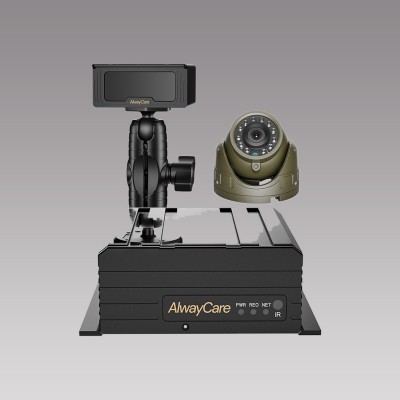
On the AlwayCare product pages, the 4-channel MR910 series and the 8- and 9-channel MR920 series list one MIC interface alongside the IO, USB, RS232 and RS485 ports. The CC960-AHD20 camera is listed with built-in audio. The product pages do not list a parked-recording mode, an ignition-off recording time or an audio on/off policy for these models.
- If you need audio, tell our engineers, who will confirm the microphone and wiring for your model.
- If you need recording while parked, send the vehicle type and the recording time you need. Our engineers will advise whether a suitable configuration exists. We do not state a parked-recording time here because the product pages do not list one.
- If you need audio switched off, say so in the inquiry and confirm it in the quotation.
| Model | Type | Listed specifications |
|---|---|---|
| MR910-DA | 4-channel AI MDVR with DSM and ADAS | 4-channel AHD; 1 MIC, 4 IO in, 1 IO out, 1 USB, RS232, RS485; 2 SD cards, up to 512GB each; GPS, 4G and Wi-Fi; 12/24V; warranty 15 months |
| MR920-360DAB2 | 8-channel AI MDVR with 360° view, ADAS, DSM and BSD | 8-channel AHD; 1 MIC, 8 IO in, 1 IO out, 1 USB, RS232, RS485; HDD up to 4TB + SD up to 512GB; GPS and Wi-Fi (4G optional); warranty 15 months |
Specifications come from the product pages. Your quotation confirms the configuration, channel layout and fitting plan for each vehicle.
To see how recording, storage and platforms fit together, read the MDVR storage calculator and Integrating AI Dashcams with Your Existing Telematics Platform.
Questions about dash cam audio and parked recording
Does Lytx DriveCam record audio?
Lytx’s privacy page says audio is configurable and off by default. The fleet decides whether to turn it on.
Does Lytx record when the car is off?
Lytx publishes material about video while vehicles are off duty and about a parked feature for trucks. We did not find a clear public statement about audio while parked. Ask Lytx for a written answer for your hardware.
Does a Samsara dash cam record when parked?
Samsara’s dual-facing AI dash cam page lists a parking mode that records between 1 and 12 hours of video after a trip ends.
Do AlwayCare dash cams record audio?
The MR910 and MR920 product pages list a MIC interface, and the CC960-AHD20 camera is listed with built-in audio. Confirm the audio setup for your model with our engineers.
Do AlwayCare recorders record when the engine is off?
The product pages do not list a parked-recording mode, so we do not state one here. Send your requirement and our engineers will advise.
Is it legal to record audio in a fleet vehicle?
It depends on the country or state and on notice and consent rules. Take local legal advice before you enable audio.
Lytx, Samsara and Motive are trademarks of their owners. AlwayCare is not affiliated with them. Information about them comes from their public websites at the time of writing and may change.
Key points
- Audio and parked recording depend on the model and the settings. Get the answer in writing.
- Lytx states that audio is configurable and off by default. Samsara lists a parking mode of 1 to 12 hours.
- Neither vendor’s public pages settle every case, so ask for written confirmation.
- Send AlwayCare your requirement and we will confirm the configuration for your model.
Send an inquiry or see the mobile DVR and vehicle video solution.
For recorder, camera and monitor packages and example layouts in one place, see the fleet vehicle video and mobile DVR solution.