AI Risk Profile for Fleets: Vehicle, Driver and Enterprise Reports in CMSV6
Fleet Safety Platform Guide
An AI risk profile combines alarms, driving time, weather and road data into one score for each vehicle, driver and fleet. In AlwayCare CMSV6 the score appears in two places: a live risk level on the monitoring map, and periodic reports by day, week or month. This guide explains how each one is built, so a fleet manager can read the numbers and act on them.
Two views of risk in CMSV6
| View | Question it answers | Time window | Higher number means |
|---|---|---|---|
| Real-time risk level | Which vehicles are at risk right now? | Last 4 hours, plus the last 5 minutes for extra points | More risk |
| Vehicle, driver and enterprise profile | How safe was this vehicle, driver or fleet over a day, week or month? | Day, week or month | Safer |
| Comprehensive risk history | When and where did each risk event happen? | Any period you choose | Not a score. It lists events |
The two scores run in opposite directions. The live risk value goes up as risk goes up. The profile safety score starts at 100 and goes down as points are deducted. Do not compare the two numbers directly.
Real-time risk: five risk types
The live risk value is built from the alarms your devices report. Each risk type is capped at 100 points, then multiplied by its weight and added up.
| Risk type | Weight | What adds points |
|---|---|---|
| Mental state | 20% | Fatigue driving, phone calls, not looking ahead for a long time, both hands off the steering wheel |
| Driving behavior | 20% | Forward collision, lane departure, following distance, pedestrian collision, frequent lane change, rapid acceleration and deceleration, camera occlusion, overspeed |
| Weather | 10% | Time driven under yellow, orange or red weather warnings. Blue adds nothing |
| Route | 20% | Passing through a risk road section, or speeding in one |
| Driving intensity | 30% | Working time over 3, 4 and 6 hours, counted only while ACC is on and positioning is valid |
Alarm points depend on the alarm level. Low adds 0.25, medium 0.5 and high 1 per alarm. Weather warnings add 2, 4 and 12 points per hour for yellow, orange and red, and an hour only counts once the warning time adds up to a full hour.
How the live value is built
- The base value counts alarms from the last 4 hours.
- An extra 20 points is added if the same alarm type repeats in the last 5 minutes: 3 or more high-level alarms, or 6 or more medium-level alarms.
- The 20 points are removed if the alarm does not repeat. Only the base value stays.
- Driving intensity adds a base of 5 points after 3 hours, 25 after 4 hours and 55 after 6 hours, plus extra points for each second over.
- A vehicle that stays offline for more than 4 hours has its risk value cleared.
Example from the CMSV6 documentation: mental state 80, driving behavior 60, weather 40, route 30 and driving intensity 50 give 80×20% + 60×20% + 40×10% + 30×20% + 50×30% = 53, which is a low-risk vehicle.
Risk levels
| Composite risk value | Level | What the platform does |
|---|---|---|
| 0–19 | No risk | No risk alarm |
| 20–59 | Low risk | Real-time low-risk alarm, shown in the vehicle bubble |
| 60–79 | Medium risk | Real-time medium-risk alarm |
| 80–100 | High risk | Real-time high-risk alarm |
To switch it on, tick real-time AI risk calculation under the weather and road-section AI alarm configuration on the server side, then save. Risk level tags then appear in the upper left corner of the live map. Click a tag to list vehicles at that level, or click the risk tab on a vehicle bubble to see its radar chart, its 3-day safety score and its 4-hour risk trend. Details are in AI Risk Statistics System and Comprehensive risk calculation rules.
Vehicle and driver profile reports
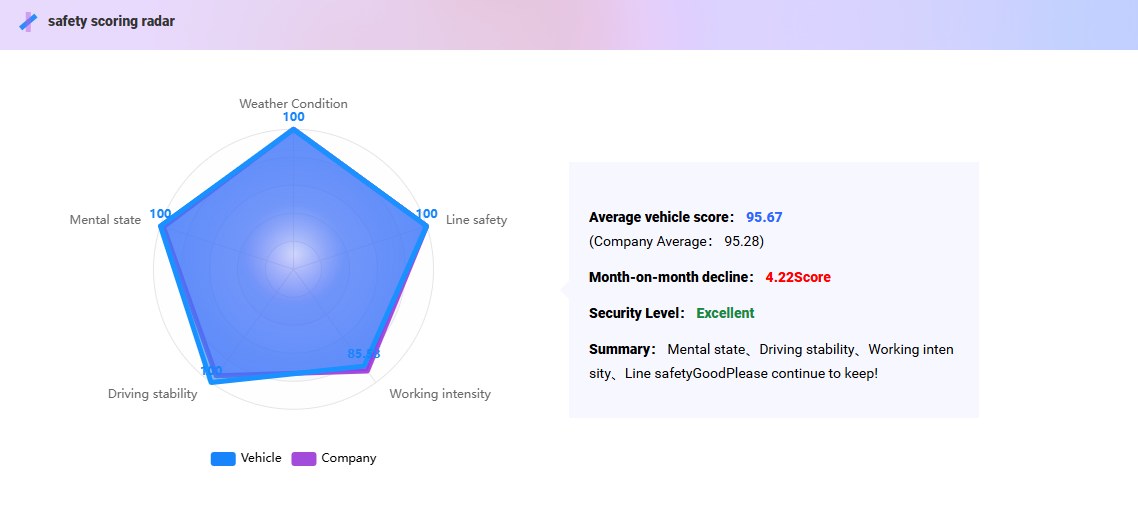
The vehicle and driver reports use a 100-point safety score. The system stores the safety value as 100 minus deductions, so a higher score means a safer record. A fleet can query by day, week or month and compare each vehicle or driver with the company average.
| Deduction | Radar dimension | How points are deducted |
|---|---|---|
| Alarms | Driving stability, mental state, route safety | By alarms per 100 km: high 1 point, medium 0.5, low 0.25. Under 100 km is counted as 100 km |
| Weather | Weather conditions | Per hour driven under a warning: low 1 point, medium 2, high 5 |
| Driving intensity | Work intensity | Continuous daily driving over 4 hours: seconds over × 5 ÷ 3600. Over 7 hours: 15 points plus seconds over × 10 ÷ 3600 |
Each deduction is capped at 100, then weighted by the share the system sets for that dimension. Safety value = 100 − the sum of each deduction × its share.
| Safety score | Safety level |
|---|---|
| 0–59 | Unqualified |
| 60–79 | Qualified |
| 80–89 | Good |
| 90–100 | Excellent |
What the report pages show
- Safety score, fleet ranking and comparison with the company average.
- Driving summary: mileage, driving time and alarm counts, which are the base for the deductions.
- Five-dimension radar chart and a score curve against the company average.
- High, medium and low risk duration and mileage trends.
- Mental state alarms and driving stability alarms per 100 km, compared with the company average.
- Driving time under weather warnings, speeding counts on risk road sections, and day, night and total driving time.
- A QR code that opens the report on a phone.
See the documentation for Vehicle Risk Portrait and Driver Risk Portrait.
Enterprise profile
The enterprise report takes the average score of all vehicles and shows the fleet as a whole. It also covers the distribution of high-risk vehicles.
| Section | What it shows |
|---|---|
| Driving summary | Total and daily average mileage and duration, average score and alarms per 100 km |
| Alarm trend | Total alarms over time, with speeding, mental state and driving stability counts |
| Risk duration and mileage | Average time and distance in high, medium and low risk states |
| Top 10 vehicles by alarms | The ten vehicles with the most alarms |
| Alarm distribution | A sunburst chart: the inner ring shows risk categories and the outer ring the alarm types and counts |
| Risk road sections | How often vehicles pass through risk road sections, and the trend |
| Driving time | Average day, night and total driving time |
See Enterprise Risk Portrait for the full list.
Trace a risk event back
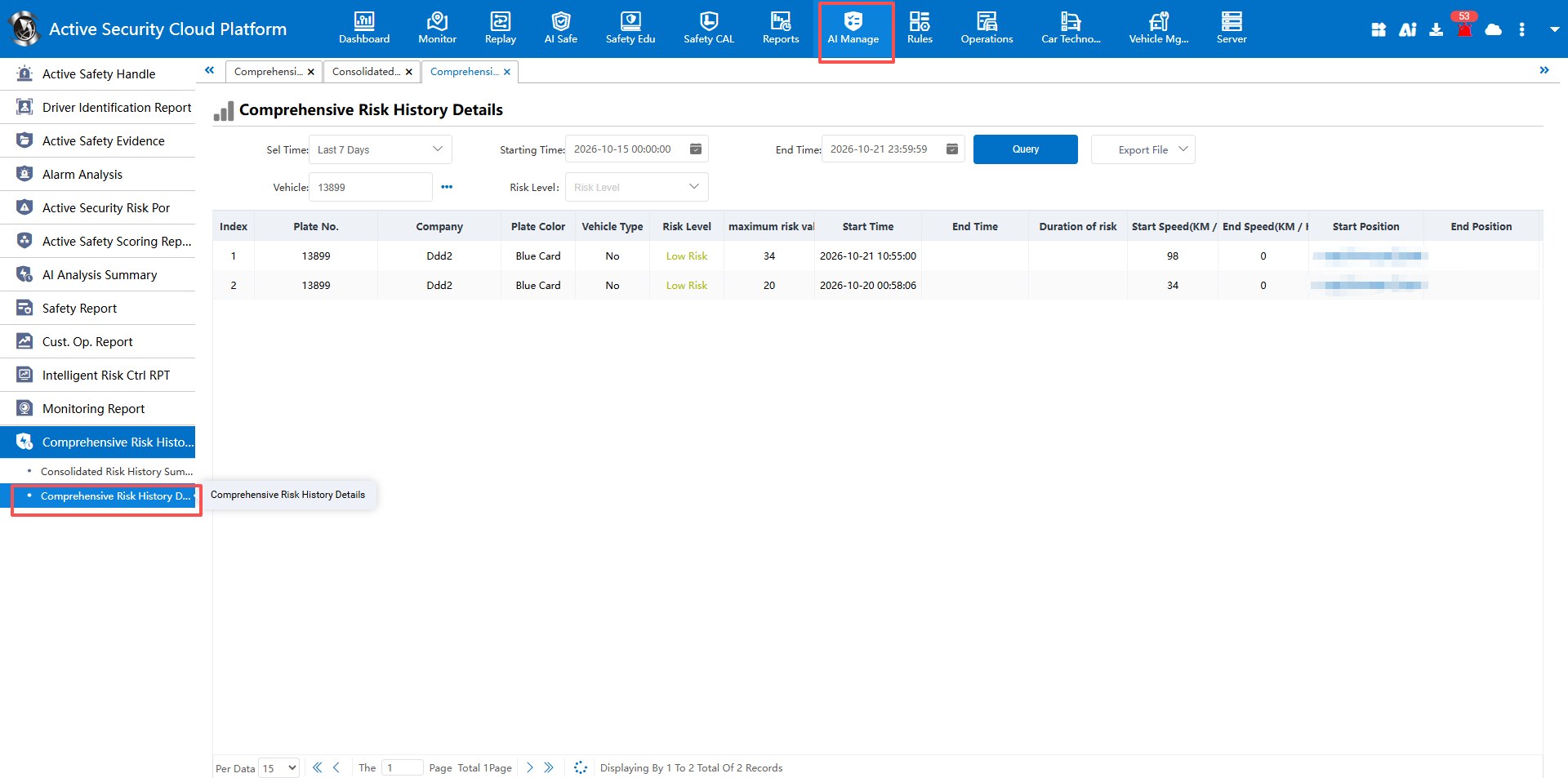
The comprehensive risk history report has a summary and a detail table. The summary lists each vehicle with its total driving time and mileage and the share spent at high, medium and low risk. The detail table lists every risk event with its level, highest risk value, start and end time, duration, start and end speed and start and end position. Filter by vehicle, time range and risk level. See Comprehensive Risk History.
A simple way to use the reports
- Look at the live risk tags during the shift and check the vehicles at medium or high risk.
- Use the history summary to pick the vehicles with the largest share of high-risk time.
- Open the detail table for those vehicles and review the events with the video.
- Read the driver profile before a coaching talk. Use the radar chart to pick one dimension to work on.
- Review the enterprise report each week or month and compare the trend, not a single day.
For event review and coaching steps, read Driver Event Review and Coaching: A Practical Fleet Workflow.
Limits to plan for
- The score is built from the alarms your devices send. Without driver monitoring or ADAS alarms, the mental state and driving behavior parts have little to count.
- Weather and route scores need weather data and risk road sections set up. See the guide to connecting devices to your platform.
- A score is a prompt to review. It is not proof that a driver was at fault.
- The documentation lists the weights for the live risk value. The profile weights are set in the system. Ask your administrator for the values used on your platform.
- Compare trends over time. A short trip can swing a score because the alarm count is scaled to 100 km.
Questions fleets ask about risk scores
What is a fleet risk score?
A fleet risk score is a number that sums up alarms, driving time and conditions into one value for a vehicle, a driver or a fleet. It helps managers decide where to look first.
Is a higher risk score good or bad in CMSV6?
It depends on the view. The real-time risk value is higher when risk is higher. The vehicle and driver profile uses a 100-point safety score, where higher is safer.
What counts toward the real-time risk value?
Five types: mental state, driving behavior, weather, route and driving intensity. They carry weights of 20%, 20%, 10%, 20% and 30%.
Can I see a driver score on my phone?
Yes. Each report has a security QR code that opens the report as a web page on a phone.
Does a risk score prove who caused an incident?
No. The score points to where to review video and events. A manager should check the record and context before any decision.
Which devices feed the score?
The score is built from alarms and operating data reported to the platform. Driver monitoring and ADAS devices add the fatigue, phone and collision alarms. See the fleet management solution for platform and device options.
Summary
- CMSV6 shows risk in two ways: a live level on the map and daily, weekly or monthly profile reports.
- The live value goes up with risk. The profile safety score goes down as points are deducted.
- Use the history report to move from a score to the actual events.
- Treat a score as a prompt to review, then coach on patterns.
Read the source documentation at docs.alwaycare.com, or send an inquiry for a platform demonstration.
For fleet management, tracking and video platform options in one place, see the fleet management solution.