Fleet Camera System Acceptance Testing: A Site Checklist
Camera Commissioning Guide
Fleet camera system acceptance testing is the documented check that every camera, recorder, display and warning function on a vehicle is installed as specified, records correctly and can be handed to the depot with evidence. On a multi-site fleet it keeps installations comparable when different installers, vehicle types and depot conditions are involved. The checklist below follows the order a commissioning job normally runs: survey, installation, image quality, recording, calibration, function tests and sign-off.

What acceptance testing should confirm
Acceptance testing is not a visual walk-around. It is a set of tests with a pass or fail result and a record attached to the vehicle file. Sign off each vehicle against the same five objectives:
- Coverage matches the plan. Every channel in the agreed camera layout is present, aimed at the intended zone and identified by channel number.
- Images are usable for review. Footage is legible in daylight, at dusk and at night under the lighting the vehicle actually works in.
- Recording is reliable. The recorder writes, stores, overwrites and exports as configured, with a synchronized timestamp.
- Warning functions behave as specified. Alerts, overlays and audible warnings trigger at the configured conditions and do not stay active during normal driving.
- Documentation is complete. Photos, serial numbers, configuration settings and test results are stored where the fleet team can retrieve them later.
If any objective has no evidence attached, do not accept the vehicle, even when the system appears to work.
Survey the site and the vehicle before installation
Multi-site programmes usually fail at the survey stage rather than the installation stage. A camera plan written for a tractor unit may not fit a rigid body, a tipper or a refrigerated trailer, and depot constraints such as bay height, wash-down routines and workshop access affect where equipment can be mounted. The survey fixes these variables before a drill is used.
- Confirm vehicle class, body type, dimensions and any existing cameras, sensors or recorders that must be kept or removed.
- Agree the final channel list and mounting positions with the fleet engineer, not only with the driver.
- Identify a protected power take-off point with an appropriately rated fuse, and a chassis ground point.
- Plan harness routes away from heat sources, moving suspension parts and sharp edges, and list every panel penetration.
- Place the recorder where it is ventilated, accessible for storage removal and not exposed to standing water or load impact.
- Record the survey with photographs and a marked-up vehicle diagram so the next site can work from the same reference.
Installation acceptance checklist
Each line needs a pass or fail, a signature and supporting evidence.
| Check area | What to verify on site | Evidence to record |
|---|---|---|
| Mounting and fasteners | Brackets fitted at the agreed positions, no drilling into structural or safety-related components, fixings tightened and marked | Photo of each mounting point, position map per vehicle |
| Field of view | Each camera aimed at its assigned zone, with no bodywork, ladder rack, marker light or load in frame | Reference still per channel |
| Cable routing | Harness in loom or conduit, grommets at every penetration, drip loops at entry points, no strain at connectors | Route diagram and photos of penetrations |
| Power and ground | Dedicated fused supply, correct polarity, ground returned to chassis, no tapping of safety circuits | Fuse rating and ground location noted in the file |
| Recorder and storage | Unit secured, storage device seated and locked, ventilation clear, cables strain-relieved | Serial numbers and storage identifier |
| Display and alerts | Monitor readable from the driving position without blocking the driver's view; warning indicators visible and audible as specified | Photo of the installed display and alert layout |
Image quality verification
Verify image quality on the finished vehicle, in the conditions it works in, with the settings that will stay in service. Test in daylight, at dusk and after dark, and keep one still image per channel as the baseline for later comparison. In low light, check for glare and blooming rather than brightness alone; a bright image with washed-out plate detail is not a pass. Practical guidance for this stage is in how to test truck camera image quality at night.
| Channel group | Daytime verification | Low-light verification |
|---|---|---|
| Front camera | Lane markings and plate characters legible at the distances used for incident review; no hood glare | Oncoming headlights do not wash out the lane ahead |
| Side and blind zone cameras | Zone from cab step to rear axle visible, with the body edge as a reference | Marker lights and curb edge visible without flare; no internal reflection in the lens housing |
| Rear camera | Coupling or rear body edge visible; reverse guidelines follow the true vehicle path | Reversing lamps and loading-bay lighting do not saturate the image |
| Driver-facing camera | Driver head and torso visible in normal cabin lighting | Infrared illumination even across the face and seat belt area, no hot spot on the windshield |
Recording, wiring and power integrity checks
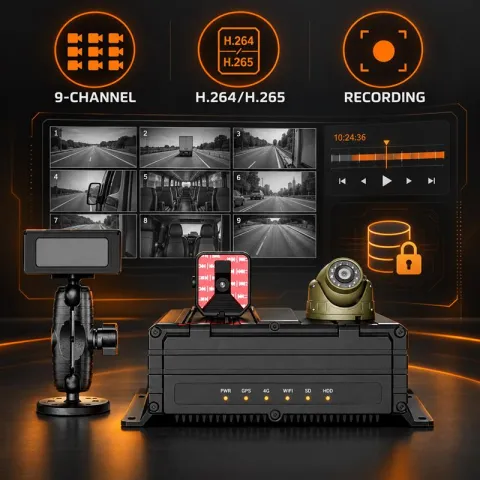
Recording tests confirm that the system will still produce evidence weeks after an event. A multi-channel mobile DVR such as the MR920 (8 AHD channels plus 1 IPC input) records several views at once, so test every enabled channel, not only the front camera. Run the tests with the engine off, with the engine running and, where the vehicle supports it, during a supply interruption to confirm files are not corrupted on shutdown. The wiring and test sequence in Mobile DVR Installation: A Fleet Wiring and Test Checklist can be applied line by line across sites.
- Verify that every enabled channel records and that disabled channels are disabled deliberately, not by fault.
- Confirm the timestamp source and time zone, then check that playback order matches the actual driving sequence.
- Check that overwrite behavior matches the retention policy agreed with the fleet, and that the oldest files are the ones replaced.
- Export a clip from each recorder type and play it back on a standard office computer, not only on the in-vehicle display.
- Check that alarm-triggered recordings, if configured, are stored in the expected location and can be retrieved.
Around-view calibration sign-off
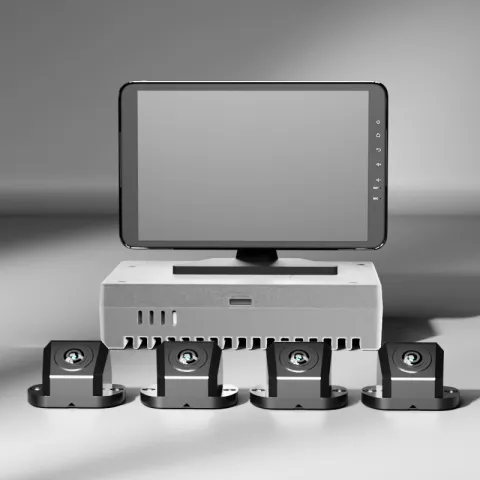
For 360-degree systems such as the M360-1 four-channel kit, acceptance is not the presence of four images on a monitor. It is a stitched view in which the seams are clean, the guidelines follow the real wheel path and the composite is stable after the vehicle has been driven. Repeat calibration after body repairs, camera replacement or any change to mounting position. The staging, mat placement and sign-off steps are in 360 Camera Installation and Calibration for Trucks: A Fleet Checklist.
- Measure the guideline alignment against the actual wheel path marked on the ground, not against the screen alone.
- Inspect each seam at the vehicle corners for gaps, double images or visible distortion.
- Re-check the stitched view after a short road test and after the vehicle is loaded to its normal operating condition.
- Store the calibration file and note the firmware version in the vehicle record.
Blind spot and warning function verification
Verify warnings against real geometry in the depot yard. Use a target object or a second vehicle to approach each monitored zone from several angles, and record where the warning starts and stops. Repeat the test on both sides of the vehicle and, for articulated combinations, with the trailer connected. A structured approach to site-by-site testing is in Blind Spot Detection Pilot Test and Acceptance Checklist for Fleets.
- Confirm that warnings appear on the correct side and channel, not only that an alarm sounds.
- Confirm that normal driving along parked vehicles and guardrails does not produce repeated false alerts.
- Check that the driver can see and hear the warning from the normal seating position with the radio on.
Standardizing the acceptance record across sites
The value of acceptance testing on a multi-site fleet comes from comparability. If one depot records only a signed sheet and another records photos, serial numbers and configuration files, the fleet cannot audit the installation later. Agree the record structure centrally and make it a condition of payment or sign-off.
| Record field | What it contains | Owner |
|---|---|---|
| Vehicle and site identifier | Registration or VIN, depot, route class, installation date | Installer |
| Channel and camera map | Channel number, mounting position, part number and serial | Installer |
| Baseline images | One still per channel, captured in daylight and after dark | Integrator |
| Configuration summary | Firmware version, alarm settings, retention setting, calibration file | Integrator |
| Test results | Pass or fail per checklist line with the tester's name and date | Fleet engineer |
| Open exceptions | Defects, temporary fixes, agreed re-test date and responsible party | Fleet manager |
Acceptance testing documents what was installed against a purchase specification. It is not evidence of vehicle type-approval for any safety function and should not be presented to drivers or auditors as such.
Handover, driver briefing and the ongoing baseline
Acceptance testing sets the reference point for maintenance. Brief the driver on what the system records, how warnings appear, what to do when a camera image is obscured and how to report a fault. Give the depot a single contact for defects and a defined re-test route. From that point the baseline images and configuration file become the comparison set for periodic inspection, using the routines in Fleet Camera Maintenance: A Practical Inspection Checklist. Where cabin cameras are fitted, agree access and notice rules first; see Driver Monitoring and Privacy.
Questions about fleet camera system acceptance testing
Who should sign off acceptance testing?
The installer signs the physical installation lines, and a fleet engineer or nominated depot representative signs the functional and recording lines. Where an integrator manages several depots, the same engineer should review every record against the central template. Two signatures make it clear who confirmed the installation and who accepted it into service.
How long should acceptance testing take per vehicle?
It depends on the scope. A single rear camera is a short check, while a full system with recorder, around-view calibration and warning zones needs a dedicated slot. Allocate time by checklist line rather than by vehicle, and keep the same allocation at every site. Compressing the slot is the most common reason records are later found incomplete.
Can acceptance testing be completed remotely?
Configuration review, baseline image review and record auditing can be done remotely and help multi-site consistency. Physical checks such as mounting security, harness routing, penetration sealing and guideline alignment against a measured wheel path need someone on site. A practical split is remote review of the evidence pack with an on-site physical sign-off.
What happens when a vehicle fails acceptance?
Log the failure as an exception with a description, the affected channel or function and a re-test date. Decide explicitly whether the vehicle returns to service with a restriction or stays in the workshop; do not leave that decision to the driver. Re-test only the failed items plus any function affected by the correction.
Does acceptance testing replace regulatory compliance?
No. It records that a specific installation matches a purchase specification on a specific vehicle. It does not certify the vehicle against type-approval requirements for safety systems, and aftermarket equipment should not be described as meeting those requirements on that basis. Keep the two records separate.
Key takeaways
- Acceptance testing is a set of pass or fail tests with evidence, not a visual walk-around.
- Survey the vehicle and depot first so the camera plan matches the body type and site conditions.
- Verify images in daylight, at dusk and after dark, and keep one baseline still per channel.
- Test recording, timestamps, overwrite behavior and export before the vehicle returns to service.
- Sign off around-view calibration against a measured wheel path, and repeat it after body repairs.
- Use one record template across all sites so installations can be audited and compared.
For in-vehicle camera options in one place, see the in-vehicle camera solution.